A lot of the agencies we work with switch between French, Dutch and English all day long. It was a bit embarrassing that Hiro itself only spoke English. Not anymore.
This post covers what we shipped over the summer.
Hiro in French
Every screen, menu, button and message in the app is now translated into French. Switch the language in your preferences and the whole interface follows. Your data stays exactly as you entered it, of course.
Settings you can actually find your way in
Settings had grown one option at a time and it showed. We redesigned settings, personal preferences and the account menu from scratch: grouped by what you are trying to do, with clear labels and fewer clicks. Small detail you asked for: you can now choose how many rows the candidate list shows per page.
Claude, connected with your Hiro account 🤖
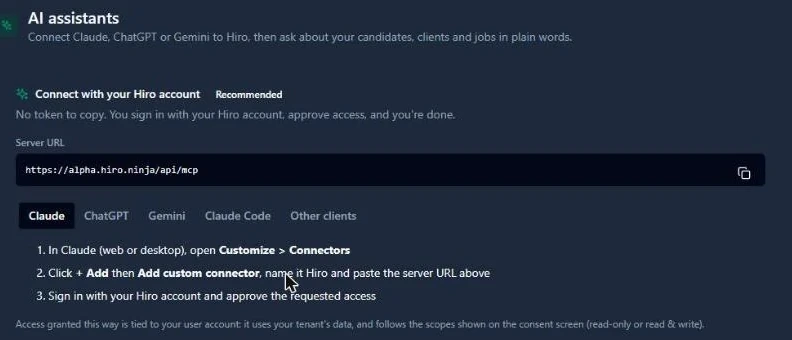
Hiro already worked with AI assistants like Claude: you can ask it to find candidates, update a client or prepare an email, and it works directly in your Hiro data. Until now, connecting it meant creating a token and pasting it somewhere, which is exactly the kind of step that makes people give up.
Now you add Hiro as a connector and sign in with your Hiro account, like you sign in anywhere else. You see what the assistant is asking access to, you approve it, done. Tokens still work if you prefer them.
Every Monday, shortlist new warehouse candidates near Ghent and draft outreach for the open roles.
Shortlist ready: 7 candidates matched, outreach drafted and waiting for your review in Hiro.
Filter clients by country
If you place people across borders, you can now filter your clients by country. The filter only offers the countries that actually appear in your client addresses, so the list stays short.
Do-not-contact, visible in your lists
Do-not-contact used to be visible only once you opened a record. Now the candidate list shows a red label next to the name, with the reason on hover. For clients, you see how many of their contacts are still reachable: a quick way to spot an account where half the people have left.
Thanks to everyone who sent us translation fixes during the beta. Keep them coming.